
 Rackmount PC
 Embedded Computing
 Industrial Portable Computers
 Rugged Tablets
 Rugged Laptop
 Industrial Panel PC
 Rugged Handheld
 Advantech Industrial PC
Choosing an NFC Rugged Tablet for Industrial Asset Tracking and Maintenance Management
Table of Contents
- I. Introduction
- II. Why NFC Matters for Industrial Asset Tracking
- III. How NFC Rugged Tablets Support Maintenance Management
- IV. NFC vs RFID vs Barcode: Which Is Better for Asset Tracking?
- V. Key Applications of NFC Rugged Tablets
- VI. How to Choose the Right NFC Rugged Tablet
- VII.Why Choose SINSMART NFC Rugged Tablets?
- VIII. FAQ
Introduction
Introduction
Why NFC Matters for Industrial Asset Tracking
Why NFC Matters for Industrial Asset Tracking
How NFC Helps Asset Tracking
| Asset Tracking Need | How NFC Helps | Business Value |
| Asset identification | Reads the NFC tag attached to the equipment | Confirms the exact asset |
| Location verification | Links asset ID with site or location data | Reduces wrong-location records |
| Maintenance history | Opens the related digital asset profile | Improves traceability |
| Check-in/check-out | Records user, time, and asset status | Reduces asset loss |
| Audit trail | Connects field actions with digital records | Supports compliance and review |
| Manual error reduction | Avoids typing long asset numbers | Improves data accuracy |
Typical Assets That Can Use NFC Tags
NFC tags can be used on many industrial assets, such as:
• Production machines
• CNC equipment
• Robotic arms
• Tools and fixtures
• Forklifts
• Pallets and containers
• Electrical cabinets
• Power equipment
• Laboratory instruments
• Vehicles and fleet equipment
• Medical devices
• Field service equipment
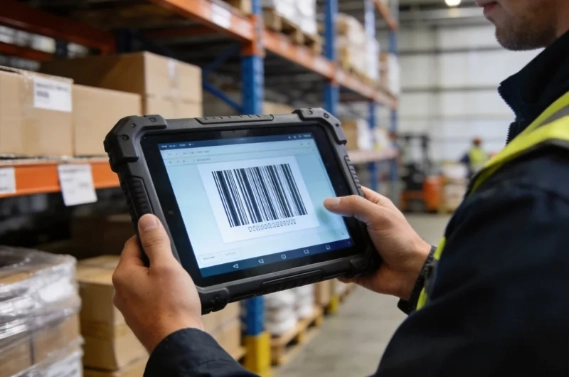
A rugged tablet with NFC helps workers scan these assets on-site, view the correct record, and update the status immediately.
How NFC Rugged Tablets Support Maintenance Management
How NFC Rugged Tablets Support Maintenance Management
An NFC rugged tablet supports this process by giving technicians a reliable device for field work.
Typical NFC Maintenance Workflow
| Step | Field Action | Role of the Rugged Tablet |
| 1 | Technician arrives at the equipment | Uses the tablet on-site |
| 2 | Technician taps the NFC tag | Confirms the asset identity |
| 3 | Asset record opens | Shows model, location, and history |
| 4 | Technician checks the task | Opens checklist or work order |
| 5 | Technician records results | Enters notes, photos, fault codes, or signature |
| 6 | Data syncs to system | Updates CMMS, EAM, or WMS |
| 7 | Manager reviews the data | Improves maintenance planning |
A rugged tablet can support maintenance management in several practical ways:
• Open the correct maintenance record after NFC scanning
• Display digital inspection checklists
• Record maintenance notes
• Capture fault photos
• Upload repair evidence
• Update work order status
• Record operator information
• Synchronize data with maintenance software
• Support preventive maintenance planning
Why This Matters for Maintenance Teams
In many industrial sites, equipment downtime is expensive. A missed inspection or wrong maintenance record can create delays, safety risks, and higher repair costs. A rugged tablet helps reduce these risks by making field data more accurate and easier to collect.
For example, a maintenance worker can tap an NFC tag on a production machine, open the correct checklist, inspect the machine, take a photo of a worn component, and submit the result before leaving the site. This reduces office paperwork and keeps managers updated in real time.

NFC vs RFID vs Barcode: Which Is Better for Asset Tracking?
NFC vs RFID vs Barcode: Which Is Better for Asset Tracking?
A rugged tablet can often be configured with more than one data collection method. For many industrial projects, NFC is used together with barcode scanning, GPS, camera, or RFID.
Technology Comparison
| Technology | Best For | Advantages | Limitations | Recommended Rugged Tablet Setup |
| NFC | One-to-one asset confirmation, inspection, maintenance check-in | Accurate, simple, low misread risk | Short reading distance | Rugged tablet with built-in NFC |
| Barcode / QR Code | Low-cost labels, inventory warehouse operations | Affordable, widely used | Needs line of sight; labels may wear out | Rugged tablet with 1D/2D barcode scanner |
| UHF RFID | Bulk asset scanning and long-range reading | Fast batch reading | Higher cost and more complex deployment | Rugged tablet with RFID module or external reader |
| GPS | Outdoor asset location and field service | Useful for vehicles and outdoor equipment | Not suitable for precise indoor asset identity confirmation | Rugged tablet with GPS and 4G/5G |
| Camera | Fault evidence and document capture | Easy to use for maintenance proof | Not an ID method by itself | Rugged tablet with industrial camera |
When to Choose NFC
Choose NFC when the main goal is accurate close-range confirmation. NFC is especially useful for:
• Equipment inspection
• Maintenance check-in
• Tool management
• Asset handover
• Calibration records
• Compliance checks
• Preventing wrong asset selection
When to Choose Barcode
Choose barcode or QR code when the project needs low-cost labeling and visual scanning. It is useful for:
• Inventory labels
• Parts tracking
• Warehouse goods
• Packaging
• Low-value assets
When to Choose UHF RFID
Choose UHF RFID when the project needs long-range or batch scanning. It is useful for:
• Bulk warehouse inventory
• Large-volume asset counting
• Pallet tracking
• Logistics yards
• High-speed scanning workflows
Best Practical Choice
For maintenance management, NFC is often the better option when accuracy matters more than distance. For warehouse inventory, barcode or UHF RFID may be more efficient. For many industrial users, the best solution is a rugged tablet that supports NFC plus barcode, camera, wireless connectivity, and optional GPS.
Key Applications of NFC Rugged Tablets
Key Applications of NFC Rugged Tablets
Key Applications of NFC Rugged Tablets
Key Applications of NFC Rugged Tablets
Key Applications of NFC Rugged Tablets
An NFC rugged tablet can be used in many industries where assets must be tracked, inspected, maintained, and recorded in harsh environments.
Industry Application Table
| Industry | Typical Assets | Main Workflow | Recommended Features |
| Manufacturing | Machines, tools, fixtures, robots | Equipment inspection and preventive maintenance | NFC, Wi-Fi, camera, glove touch, long battery |
| Warehouse & Logistics | Forklifts, pallets, containers, racks | Asset check-in/out and warehouse tracking | NFC, barcode scanner, Wi-Fi, 4G/5G, charging dock |
| Utilities & Energy | Substations, meters, pipelines, outdoor cabinets | Field inspection and maintenance records | NFC, GPS, 4G/5G, IP-rated protection, sunlight-readable display |
| Transportation | Vehicles, depot equipment, rail equipment | Fleet inspection and repair records | NFC, camera, GPS, vehicle mount |
| Healthcare & Laboratory | Medical devices, lab instruments, calibration tools | Equipment tracking and audit records | NFC, Wi-Fi, camera, stable lifecycle |
| Field Service | Customer-site equipment and mobile assets | Remote maintenance and work order updates | NFC, 4G/5G, camera, digital signature support |
Manufacturing Equipment Inspection
In manufacturing, a rugged tablet can help technicians identify production equipment, open digital checklists, record inspection results, and upload maintenance data. It is useful for CNC machines, robotic arms, production lines, control cabinets, and tools.
NFC helps confirm the correct machine before maintenance begins. This improves data accuracy and reduces the risk of assigning records to the wrong equipment.In manufacturing, a rugged tablet can help technicians identify production equipment, open digital checklists, record inspection results, and upload maintenance data. It is useful for CNC machines, robotic arms, production lines, control cabinets, and tools.
NFC helps confirm the correct machine before maintenance begins. This improves data accuracy and reduces the risk of assigning records to the wrong equipment.
Warehouse and Logistics Asset Tracking
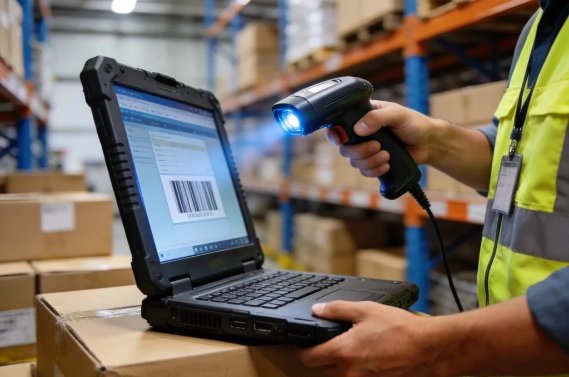
In logistics, workers often need to track pallets, forklifts, containers, racks, and returnable transport items. A rugged tablet with NFC and barcode scanning can support asset check-in, check-out, movement tracking, and maintenance checks.
For warehouse teams, stable Wi-Fi, long battery life, barcode scanning, and charging accessories are often as important as NFC.
Utilities and Energy Field Inspection
Utilities and energy workers often operate outdoors or in remote sites. They may inspect power equipment, pipelines, water facilities, telecom cabinets, or meters. A rugged tablet with NFC can identify the equipment and help the worker record inspection results directly at the site.
For this environment, buyers should consider GPS, 4G/5G, sunlight-readable display, IP-rated protection, and wide-temperature support.
Transportation and Fleet Maintenance
Fleet maintenance teams can use a rugged tablet to inspect vehicles, scan equipment tags, record repair history, and take photos of damage. NFC can be used for vehicle identity confirmation, while GPS and camera functions help support field records.
Vehicle mounting, stable power input, and vibration resistance are important for this use case.
Field Service and Remote Maintenance
Field service teams need mobile tools that work outside the office. With an NFC rugged tablet, a technician can arrive at a customer site, tap the asset tag, open service history, record the repair, capture photos, and update the work order through a wireless network.
This reduces reporting delays and improves service transparency.
How to Choose the Right NFC Rugged Tablet
How to Choose the Right NFC Rugged Tablet
How to Choose the Right NFC Rugged Tablet
How to Choose the Right NFC Rugged Tablet
1.Choose Android or Windows Based on Software
| OS Option | Best For | Advantages | Considerations |
| Android rugged tablet | Mobile inspection apps, warehouse apps, cloud CMMS | Easy mobile deployment, app-friendly, efficient for field use | Check MDM and app compatibility |
| Windows rugged tablet | Windows industrial software, legacy systems, factory IT environments | Strong compatibility with Windows applications | Usually needs more power and may cost more |
| Linux rugged tablet | Custom industrial systems and specialized software | Flexible for customized projects | Requires technical development support |
If your team uses mobile apps or cloud-based inspection software, an Android rugged tablet may be suitable. If your factory uses Windows-based CMMS, EAM, or industrial software, a Windows rugged tablet may be the better choice.
2.Confirm NFC Compatibility
Before buying, confirm that the rugged tablet can read the NFC tags used in your asset tracking system. Important points include:
• NFC tag type
• NFC reading distance
• NFC reading position on the device
• Software compatibility
• SDK or API support
• Existing asset tag compatibility
• Data security requirements
NFC is useful only when the hardware, tags, and software work together.
3.Match Rugged Protection to the Worksite
Different worksites need different rugged features.
| Work Environment | Recommended Features |
| Factory floor | Drop resistance, dust protection, glove touch |
| Warehouse | Barcode scanner, Wi-Fi, long battery, charging dock |
| Outdoor field service | IP-rated protection, sunlight-readable screen, GPS, 4G/5G |
| Cold storage | Wide-temperature support, glove touch, stable battery |
| Vehicle-mounted use | Vehicle dock, vibration resistance, stable power connection |
| Wet or dusty site | Sealed ports, rugged housing, IP protection |
Do not choose a rugged tablet only by price. A low-cost device that fails in the field can create higher downtime, replacement, and service costs.
4.Evaluate Display and Touch Performance
A rugged tablet should be easy to use in real work conditions. Check for:
• High brightness
• Sunlight-readable display
• Anti-glare design
• Glove touch
• Wet touch
• Stylus support
• Scratch-resistant surface
This is especially important for outdoor inspection, warehouse work, and maintenance teams wearing gloves.
5.Check Battery Life and Charging Options
Battery performance is critical for full-shift work. Consider:
• Battery capacity
• Replaceable battery
• Hot-swappable battery if available
• Charging dock
• Multi-bay charger
• Vehicle charger
• Power-saving design
For large deployments, charging management is as important as battery capacity. A rugged tablet used by many workers should be easy to charge, store, and manage.
6.Confirm Connectivity and Expansion Options
Maintenance data is valuable only when it can be synchronized. Check whether the rugged tablet supports:
• Wi-Fi
• Bluetooth
• 4G LTE
• 5G
• GPS
• USB
• USB-C
• HDMI
• Docking connector
• Optional Ethernet through dock
For asset tracking and maintenance management, many users also need barcode scanning, camera, RFID, fingerprint, or custom modules. A modular rugged tablet platform can reduce the need for multiple devices.

Why Choose SINSMART NFC Rugged Tablets?
Why Choose SINSMART NFC Rugged Tablets?
SINSMART is a dedicated manufacturer of rugged computers and industrial computers. For industrial asset tracking and maintenance management, SINSMART offers rugged tablet options that can support different screen sizes, operating systems, rugged ratings, wireless modules, and data collection requirements.
SINSMART rugged tablet solutions are suitable for:
• Manufacturing equipment inspection
• Warehouse and logistics asset tracking
• Utilities field inspection
• Transportation and fleet maintenance
• Field service management
• Industrial maintenance records
• System integration projects
SINSMART Rugged Tablet Advantages
| Advantage | Value for Industrial Buyers |
| Factory-direct manufacturing | Better control over product quality and customization |
| Wide product range | Easier to match different project requirements |
| Multiple operating systems | Windows, Android, and Linux options |
| Rugged protection | IP-rated and military-standard options available |
| Modular expansion | NFC, RFID, barcode, fingerprint, 4G/5G, GPS, camera |
| ODM customization | Supports project-specific hardware and branding needs |
| Long-term project support | Suitable for system integrators and enterprise buyers |
Recommended SINSMART Rugged Tablet Models
| Model | OS / Platform | Key Specifications | Suitable Applications |
| SIN-I1001E-N150 | Windows 11, Intel N150 | 10.1" FHD outdoor-visible display, slim lightweight IP67 rugged design, Wi-Fi 6, 4G/5G, NFC, fingerprint,1D scanner | Maintenance management, field service, asset tracking, enterprise Windows workflows |
| SIN-T1087EL | Windows 10, Intel N5105 | 10.1" IPS 1200×1920 display, 700 nits, 8–16GB RAM, IP65, MIL-STD-810G, USB-A, USB-C, HDMI | Factory inspection, industrial software use, equipment maintenance records |
| SIN-Q0801E-670 / SIN-Q1001E-670 | Android 14 | 8" or 10.1" options, 8GB RAM + 128G storage, IP65, MIL-STD-810H, light and durable design, long battery life | Mobile inspection, warehouse asset tracking, logistics Android field apps |
Customization for Industrial Projects
SINSMART can support different customization needs for B2B projects, such as:
• NFC module configuration
• Barcode scanner integration
• RFID expansion
• GPS and 4G/5G modules
• Fingerprint module
• Memory and storage configuration
• Docking and mounting adaptation
• A-side logo and startup logo customization
• Button name and function customization
• Industry-specific module combinations
For system integrators and enterprise buyers, this flexibility is important. A standard rugged tablet may not fit every project. A customized rugged tablet can better match the customer’s software, worksite, and deployment plan.
SINSMART Call to Action
If you are choosing a rugged tablet for industrial asset tracking, equipment inspection, or maintenance management, SINSMART can help evaluate your working environment, NFC requirements, operating system, wireless communication, accessories, and customization needs.
Contact SINSMART to discuss a customized NFC rugged tablet solution for manufacturing, logistics, utilities, transportation, field service, or industrial maintenance projects.
FAQ
FAQ
FAQ
Q1. What is an NFC rugged tablet used for?
A: An NFC rugged tablet is used to identify assets, open digital records, complete inspection checklists, update maintenance tasks, and synchronize field data with management systems. It is commonly used in manufacturing, logistics, utilities, transportation, healthcare, and field service.
Q2. Is NFC better than RFID for asset tracking?
A: NFC is better for close-range, one-to-one asset confirmation. UHF RFID is better for long-range or batch scanning. If the goal is to confirm the exact equipment before maintenance, NFC is often more suitable. If the goal is to scan many assets quickly, RFID may be better.
Q3. Can an NFC rugged tablet work with CMMS or EAM software?
A: Yes. An NFC rugged tablet can work with CMMS or EAM software if the operating system, NFC function, app, API, and network connection are compatible. Buyers should confirm software integration before purchasing.
Q4. Should I choose an Android or Windows rugged tablet?
A: Choose an Android rugged tablet for mobile apps, cloud-based inspection software, warehouse tasks, and field service apps. Choose a Windows rugged tablet for Windows-based industrial software, legacy systems, and enterprise IT environments.
Q5. What rugged features are important for maintenance teams?
A: Important features include IP-rated protection, drop resistance, shock resistance, glove touch, wet touch, sunlight-readable display, long battery life, camera, wireless connectivity, and docking options.
Q6. Can one rugged tablet support NFC, barcode, GPS, and 4G/5G?
A: Yes. Many industrial rugged tablet configurations can support multiple modules, such as NFC, barcode scanner, GPS, 4G/5G, camera, RFID, and fingerprint. The exact configuration depends on the model and project requirements.
Q7. Which industries use NFC rugged tablets?
A: NFC rugged tablet solutions are used in manufacturing, logistics, utilities, transportation, healthcare, public safety, field service, energy, rail transit, and warehouse operations.
Q8. Why choose SINSMART for NFC rugged tablet projects?
A: SINSMART provides a wide range of rugged tablet options with Windows, Android, and Linux systems, multiple screen sizes, rugged protection, NFC and other expansion modules, and ODM customization. This makes SINSMART suitable for industrial buyers, system integrators, and long-term asset management projects.


LET'S TALK ABOUT YOUR PROJECTS
- sinsmarttech@gmail.com
-
3F, Block A, Future Research & Innovation Park, Yuhang District, Hangzhou, Zhejiang, China
Our experts will solve them in no time.