
 Rackmount PC
 Embedded Computing
 Industrial Portable Computers
 Rugged Tablets
 Rugged Laptop
 Industrial Panel PC
 Rugged Handheld
 Advantech Industrial PC
Blog
Industrial PC Expansion Explained: Mini PCIe vs PCIe vs M.2 for Buyers
2026-07-30
Table of Contents
- I. Introduction
- II. Quick Answer: Which Expansion Interface Does What?
- III. Mini PCIe, PCIe, and M.2 Explained
- IV. Electrical Compatibility Matters More Than Connector Shape
- V. Match the Interface to the Industrial Workload
- VI. Verified SINSMART Expansion Examples
- VII.Thermal, Mechanical, and Environmental Checks
- VIII. Industrial PC Expansion Selection Checklist
- IX. What to Put in an RFQ
- X. FAQ
Introduction
Introduction
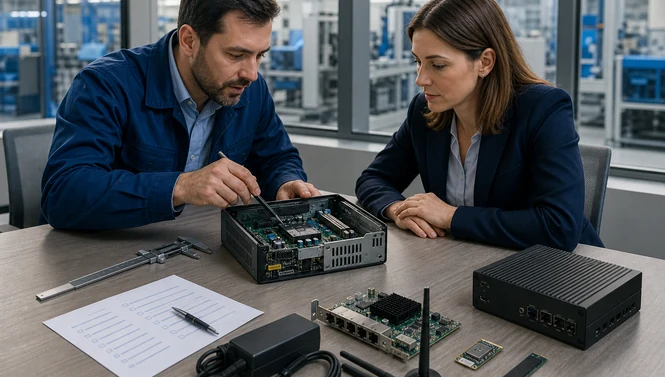
An industrial PC may list Mini PCIe, PCIe, and M.2 expansion, yet those connectors are not interchangeable. Choosing by connector name alone can leave a buyer with the wrong signal, too few lanes, an unsupported module, or a card that cannot be cooled inside the chassis.
The issue is becoming more important as computing moves closer to machines and sensors. On April 8, 2025, IDC forecast that Japan’s edge-infrastructure spending would grow 12.9% in 2025, with manufacturing among the detailed industry segments in its updated guide (IDC, April 8, 2025). More edge workloads mean more demand for local storage, vision capture, industrial networking, wireless links, and accelerators.
The practical answer is simple: use full-size PCIe for high-bandwidth add-in cards, Mini PCIe mainly for established compact communications modules, and M.2 for compact storage or communications—provided the socket’s key, size, and electrical signals match the module. Buyers should validate the complete path from CPU lanes to drivers, power, thermals, antennas, and mechanical retention.
Quick Answer: Which Expansion Interface Does What?
Quick Answer: Which Expansion Interface Does What?
|
Interface
|
Best-fit industrial uses
|
Main buyer checks
|
Typical limitation
|
|
PCIe
|
Frame grabbers, GPUs, DAQ, motion control, high-speed NICs, PoE cards
|
Lane width, generation, slot length, card height, power, cooling
|
Requires more chassis space
|
|
Mini PCIe
|
Wi-Fi, 4G/3G, GNSS, CAN or serial modules, some mSATA storage
|
Whether the socket carries PCIe, USB, or mSATA; full/half size; SIM and antennas
|
Older, lower-density ecosystem
|
|
M.2
|
NVMe/SATA storage, Wi-Fi/Bluetooth, 4G/5G, compact I/O modules
|
Key type, module length, PCIe/SATA/USB signaling, lane count, cooling
|
Same shape does not guarantee same function
|
PCI-SIG describes PCIe as a scalable serial I/O interconnect with multiple lane widths. Its M.2 overview calls M.2 a family of smaller form factors that evolved from Mini Card and supports greater functional integration (PCI-SIG PCIe architecture; PCI-SIG M.2 overview).
The key buying principle is: a connector is only the mechanical starting point. Ask what signals are wired, how many lanes reach the socket, which generation is supported, and whether another device shares those resources.
Mini PCIe, PCIe, and M.2 Explained
Mini PCIe, PCIe, and M.2 Explained
PCIe: the choice for full-size add-in cards
Conventional PCIe slots accept add-in cards in physical sizes such as x1, x4, x8, and x16. The number describes the connector and potential lane count, but a physically long slot may be electrically wired with fewer lanes. A x16-shaped slot connected as x4 cannot deliver x16 bandwidth.
PCIe is normally the strongest option when an industrial PC needs a frame grabber, discrete GPU, multi-port Ethernet adapter, PoE card, DAQ interface, or motion controller. It also gives system integrators the broadest card ecosystem. The tradeoff is space, power, and heat.
Mini PCIe: compact and still useful
Mini PCIe, or PCI Express Mini Card, remains common in deployed industrial equipment because it supports compact modules and long-established supplier ecosystems. Common functions include cellular modems, Wi-Fi, GNSS, CAN, extra serial ports, and sometimes mSATA storage.
Do not assume every Mini PCIe socket carries a PCIe signal. Some modules communicate over USB routed through the connector. Some sockets support mSATA instead. Others are multiplexed, meaning the chosen module changes what another storage or I/O option can do. Request the motherboard manual or a supplier wiring statement.
M.2: a form factor, not a promise of NVMe
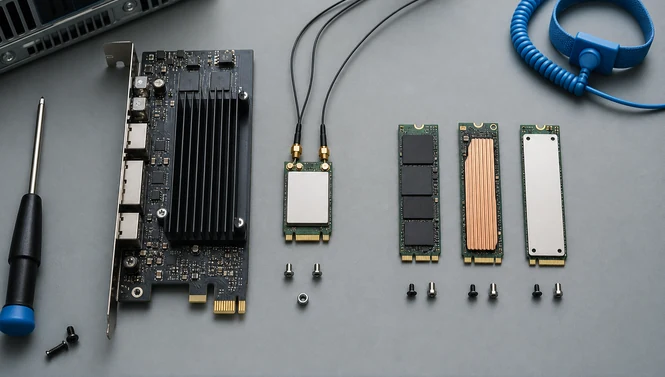
M.2 defines mechanical dimensions and connector keying, but an M.2 socket can carry PCIe, SATA, USB, and other signals.
Common patterns include:
-
M-key 2242/2280: often PCIe x4 NVMe storage, sometimes SATA.
-
E-key 2230: commonly Wi-Fi and Bluetooth.
-
B-key 3042/3052: often cellular WWAN and USB, sometimes SATA or limited PCIe.
The four-digit size describes width and length in millimeters. A 2280 module is 22 mm wide and 80 mm long. Buyers must confirm that the chassis has the correct mounting point and clearance, not merely the correct key.
Electrical Compatibility Matters More Than Connector Shape
Electrical Compatibility Matters More Than Connector Shape
Electrical Compatibility Matters More Than Connector Shape
Match the Interface to the Industrial Workload
Match the Interface to the Industrial Workload
Match the Interface to the Industrial Workload
Match the Interface to the Industrial Workload
Machine vision and inspection
Frame grabbers and high-port-count camera adapters usually need full-size PCIe. Start with camera count, interface, resolution, bit depth, and frame rate; calculate aggregate bandwidth; then add processing and storage headroom. A GPU may require another x16 slot plus substantial power and airflow.
An industrial PC with GPU can be appropriate when the workload combines multi-camera acquisition and local inference. The category comparison shows why configuration-level validation matters: listed platforms range from a single x16 slot to multiple x16/x8/x4 slots, Mini PCIe, and M.2 B- or E-key sockets.
Wireless gateways and mobile equipment
Mini PCIe and M.2 B-key are often used for 4G/5G modules. M.2 E-key is common for Wi-Fi and Bluetooth. The module is only one part of the design. Buyers also need:
-
Accessible SIM or eSIM provisioning.
-
Correct antenna count, connector type, and cable length.
-
Antenna placement away from noisy electronics and metal shielding.
-
Regional carrier bands and certifications.
-
Driver support for the chosen OS image.
Storage and data logging
M.2 M-key NVMe storage offers high throughput in a small footprint. It suits local databases, vision buffers, AI models, and event logging. Sustained industrial writes, however, can heat the controller and trigger throttling. Specify endurance, power-loss behavior, operating temperature, heat-spreader contact, and service access.
SATA M.2 may be sufficient for moderate logging workloads and can simplify thermal design. “M.2” alone is not a storage performance specification.
Automation, motion, and test
DAQ, isolated I/O, motion-control, fieldbus, and serial expansion cards range from compact M.2 or Mini PCIe modules to full PCIe cards. Full-size PCIe often provides better isolation, connector access, and channel density. Compact modules are valuable where volume and power are constrained.

Verified SINSMART Expansion Examples
Verified SINSMART Expansion Examples
The SINSMART industrial PC portfolio covers rackmount, embedded, wall-mount, portable, and panel-computer formats. Expansion should be compared at the exact model level.
The SINSMART embedded computer category lists the SIN-3092 series with SATA, M.2 E-key, M.2 M-key, and Mini PCIe, while the SIN-3042 series is described with Mini PCIe for Wi-Fi or 4G. These examples show how compact systems can separate storage and communications functions.
For a newer compact platform, the SIN-3094-H610EFT product page states one M.2 2280 M-key PCIe Gen4 x4 socket for NVMe, two Mini PCIe slots, and one M.2 E-key socket. That combination supports fast storage and several communications options, but the precise wireless module, SIM arrangement, and regional configuration still require confirmation.
The SIN-31A4-H810 page specifies an M.2 2280 M-key PCIe Gen4 x4 NVMe socket in a 212 × 165 × 63 mm fanless chassis. It illustrates a compact design where buyers should prioritize storage thermals and service access.
The SIN-3190-Q670E page lists an M.2 2280 M-key PCIe Gen4 x4 socket for NVMe storage alongside two hot-swappable 2.5-inch drive trays. This is useful where an installation needs both compact high-speed storage and serviceable bulk storage.
Where a conventional card is required, review the fanless PC with PCIe slot category or a rackmount industrial PC instead of trying to adapt a compact M.2 socket.
Thermal, Mechanical, and Environmental Checks
Thermal, Mechanical, and Environmental Checks
Thermal, Mechanical, and Environmental Checks
Expansion changes an industrial PC’s validated system, not just its feature list. A high-power card can raise internal temperature, obstruct airflow, or exceed the power adapter’s transient capacity. An NVMe SSD can throttle even when the CPU remains cool.
Check:
-
Card length, height, thickness, and bracket type.
-
Connector and cable clearance after the cover is installed.
-
Slot power and auxiliary power connectors.
-
Total DC input and adapter margin.
-
Airflow direction or conduction path.
-
M.2 heat spreader and thermal-pad stack-up.
-
Antenna cable bend radius and strain relief.
-
Screw retention for vibration-prone deployments.
-
Operating-temperature rating of every installed module.
For fanless systems, adding a card can create a new heat source without adding airflow. Request thermal validation at the expected ambient temperature and workload. For mobile or vibrating equipment, use positive card retention and locking external connectors where appropriate.

Industrial PC Expansion Selection Checklist
Industrial PC Expansion Selection Checklist
Industrial PC Expansion Selection Checklist
Use this sequence before choosing a chassis:
-
Define the workload. List cameras, sensors, networks, storage rate, cellular functions, and future additions.
-
Map each function to an interface. Use PCIe for demanding add-in cards; use M.2 or Mini PCIe for validated compact modules.
-
Calculate bandwidth. Include protocol overhead and simultaneous traffic.
-
Verify the lane map. Record generation, width, sharing, and chipset/CPU routing.
-
Confirm module mechanics. Record card dimensions, M.2 key and length, bracket, and mounting hardware.
-
Build a power budget. Include startup and peak draw, not only typical power.
-
Check heat rejection. Validate sustained rather than short benchmark performance.
-
Complete the RF design. Specify modem, SIM, antennas, cables, and country/carrier requirements.
-
Validate software. Test BIOS, boot, drivers, OS version, suspend/wake, and recovery.
-
Freeze the bill of materials. Record firmware, module revision, cable, antenna, and approved substitutes.
Leave headroom only when it is genuinely usable. An empty connector with no available lanes, cooling capacity, bracket opening, or driver plan is not meaningful future expansion.
What to Put in an RFQ
What to Put in an RFQ
What to Put in an RFQ
A strong industrial PC request for quotation should include:
-
Application and deployment environment.
-
Required add-in card or module part numbers.
-
PCIe generation and minimum lane width.
-
M.2 key, length, and signal requirement.
-
Mini PCIe full- or half-size requirement.
-
Number and type of antennas and SIMs.
-
Storage capacity, endurance, and sustained write rate.
-
Maximum ambient temperature, vibration, and shock conditions.
-
Operating system and required driver versions.
-
Expected production quantity, service life, and change-control needs.
Send photos or mechanical drawings of existing cards when possible. Ask the supplier to confirm fit, electrical compatibility, power, thermal operation, BIOS detection, driver support, and whether the proposed configuration has been integration-tested. For a tailored recommendation, provide this checklist to SINSMART with the target workload and installation envelope.
FAQ
FAQ
FAQ
Q1: Is Mini PCIe the same as PCIe?
Mini PCIe uses the PCI Express Mini Card form factor, but a Mini PCIe socket may carry PCIe, USB, or other supported signals. It is not physically compatible with a conventional full-size PCIe add-in card.
Q2: Is every M.2 slot an NVMe slot?
No. M.2 describes a form factor and keying system. The socket may carry PCIe/NVMe, SATA, USB, or a combination. Check the exact key, signal, and BIOS support.
Q3: Can a PCIe x16 card run in a slot wired as x4?
It may work if the connector is physically open or x16-sized and the card supports link negotiation, but performance is limited to x4 and platform compatibility must be confirmed.
Q4: Which interface is best for a machine-vision frame grabber?
Full-size PCIe is usually preferred because frame grabbers often need higher bandwidth, external connectors, and secure brackets. Match the required generation and lane width to the camera workload.
Q5: Should I choose Mini PCIe or M.2 for a cellular modem?
Choose the interface supported by the industrial PC and the approved modem ecosystem. Verify USB/PCIe signaling, SIM access, antenna connections, regional bands, drivers, and module length.
Q6: Can an M.2 socket support both SATA and NVMe?
Some sockets support both, but many support only one. The motherboard specification must state which signals are wired and whether installing one device disables another port.
Q7: Why does an NVMe SSD throttle in an industrial PC?
High sustained writes can heat the SSD controller. Limited airflow, poor thermal-pad contact, and high ambient temperature can reduce performance. Validate the drive and cooling path under the real workload.
Q8: What expansion margin should a buyer request?
Request usable margin in lanes, power, cooling, space, and software support. Counting empty sockets without checking those resources gives a misleading picture of future expandability.
Q9: What should be tested before production approval?
Test device detection, drivers, sustained bandwidth, boot and recovery, thermal behavior, peak power, vibration retention, antenna performance, and all simultaneous I/O under the final OS image.


LET'S TALK ABOUT YOUR PROJECTS
- sinsmarttech@gmail.com
-
3F, Block A, Future Research & Innovation Park, Yuhang District, Hangzhou, Zhejiang, China
Our experts will solve them in no time.