
 Rackmount PC
 Embedded Computing
 Industrial Portable Computers
 Rugged Tablets
 Rugged Laptop
 Industrial Panel PC
 Rugged Handheld
 Advantech Industrial PC
Why Do Substation Inspection Teams Need Rugged Laptops for Fault Analysis and Maintenance Reporting?
Table of Contents
- I. Introduction
- II. Why Field Computing Matters in Substation Inspection
- III. Why Ordinary Laptops Are Not Enough for Substation Maintenance
- IV. How Rugged Laptops Support Substation Fault Analysis
- V. How Rugged Laptops Improve Maintenance Reporting
- VI. Rugged Laptop vs Rugged Tablet for Substation Inspection
- VII.Key Features to Look for in a Substation Rugged Laptop
- VIII. Recommended SINSMART Rugged Laptop Models for Substation Teams
- IX. Why Choose SINSMART for Substation Inspection Projects
- X. FAQ About Fanless Embedded PCs for Dusty Production Environments
Introduction
Introduction
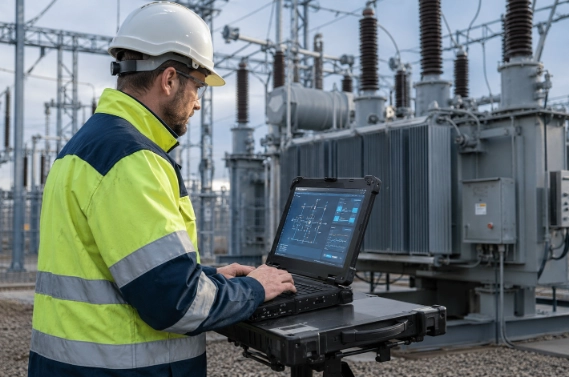
Why Field Computing Matters in Substation Inspection
Why Field Computing Matters in Substation Inspection
Substation inspection is becoming more data-driven
-
Checking transformers, circuit breakers, switchgear, cables, relays, grounding systems, and control panels
-
Reviewing historical fault records and maintenance logs
-
Connecting to testing instruments or relay protection devices
-
Capturing photos, screenshots, and measurement data
-
Completing digital checklists and maintenance reports
-
Uploading reports to a CMMS, asset management platform, or internal server
Field teams need a complete workflow, not just a display device
| Workflow Stage | What Engineers Need | Why a Rugged Laptop Helps |
| Inspection preparation | Drawings, previous reports, equipment list | Large screen and Windows file compatibility |
| Field inspection | Checklists, photos, notes, equipment status | Durable body and outdoor screen readability |
| Device connection | Relays, testers, meters, communication tools | Rich I/O ports such as USB, LAN, RS232, HDMI, Type-C |
| Fault analysis | Waveform files, event records, alarm logs | Stronger CPU, RAM, SSD, and engineering software support |
| Reporting | Excel, PDF, Word, CMMS forms | Physical keyboard and stable Windows environment |
| Data handover | Upload reports, share files, remote support | Wi-Fi, Bluetooth, 4G/5G, LAN, or project-specific modules |
Why Ordinary Laptops Are Not Enough for Substation Maintenance
Why Ordinary Laptops Are Not Enough for Substation Maintenance
Office laptops are designed for clean and stable environments
-
Poor protection against dust, moisture, rain, and accidental drops
-
Weak screen visibility in outdoor sunlight
-
Limited ports for industrial and electrical devices
-
Shorter field lifecycle under vibration and rough transport
-
Risk of shutdown or damage during critical data review
-
Less reliable operation during long field shifts
Rugged laptops reduce interruption during critical field tasks
| Requirement | Ordinary Laptop | Rugged Laptop |
| Dust and moisture protection | Limited | Designed for industrial and outdoor environments |
| Drop and vibration resistance | Usually weak | Reinforced structure for mobile field work |
| Sunlight readability | Often difficult outdoors | High-brightness display options |
| Industrial connectivity | Limited consumer ports | Better support for USB, LAN, RS232/COM, HDMI, Type-C |
| Long report editing | Possible but less reliable in the field | Better for on-site documentation |
| Engineering software | Good in office, but limited by field durability | Windows environment plus rugged construction |
| Long-term field use | Higher failure risk | Better lifecycle for harsh use |
Rugged laptop vs consumer laptop: the buying logic
-
The team works outdoors or in industrial environments
-
The laptop is frequently transported between sites
-
Engineers connect to multiple field devices
-
Reports must be finished on site
-
Field data must be saved and transferred reliably
-
The company wants a longer service lifecycle
How Rugged Laptops Support Substation Fault Analysis
How Rugged Laptops Support Substation Fault Analysis

How Rugged Laptops Improve Maintenance Reporting
How Rugged Laptops Improve Maintenance Reporting
How Rugged Laptops Improve Maintenance Reporting
How Rugged Laptops Improve Maintenance Reporting
How Rugged Laptops Improve Maintenance Reporting
-
Missing inspection details
-
Repeated manual data entry
-
Inconsistent report format
-
Delayed reporting after returning to the office
-
Higher risk of losing photos, files, or test data
-
Difficult tracking of maintenance history
-
Inspect equipment on site
-
Connect to diagnostic instruments or relay devices
-
Export event records, test data, or images
-
Review abnormal results on the rugged laptop
-
Fill in the digital maintenance report
-
Attach evidence such as photos, screenshots, and files
-
Save, upload, or send the report before leaving the substation
Rugged Laptop vs Rugged Tablet for Substation Inspection
Rugged Laptop vs Rugged Tablet for Substation Inspection
Rugged Laptop vs Rugged Tablet for Substation Inspection
Rugged Laptop vs Rugged Tablet for Substation Inspection
Rugged tablets are useful for quick inspection
-
Basic equipment inspection
-
Barcode or QR code scanning
-
Asset registration
-
Photo capture
-
Short checklist completion
-
Simple data collection
-
Walking inspections across large sites
Rugged laptops are better for fault analysis and reporting
| Task | Rugged Tablet | Rugged Laptop |
| Quick inspection | Strong | Strong |
| Barcode/NFC asset work | Stronger | Available with accessories or options |
| Long maintenance reports | Less efficient | Stronger with physical keyboard |
| Fault waveform review | Limited by screen and software | Better for detailed analysis |
| Relay software and engineering tools | Depends on system | Stronger Windows software compatibility |
| Multiple device connections | More limited | Better I/O expansion |
| Drawing and manual review | Good for quick viewing | Better for detailed review |
| On-site troubleshooting | Good for simple tasks | Better for complex diagnostics |
When should a substation team choose a rugged laptop?
-
Engineers need to run Windows engineering software
-
Reports require long descriptions or structured templates
-
Fault recorder files or waveform data need to be reviewed
-
Multiple field devices must be connected
-
A large screen is needed for drawings and diagrams
-
The team needs better field data management
-
The project requires a reliable device for long-term industrial use
Key Features to Look for in a Substation Rugged Laptop
Key Features to Look for in a Substation Rugged Laptop
Rugged protection: IP rating, drop resistance, and wide temperature
-
IP-rated dust and water protection
-
Drop resistance
-
Vibration resistance
-
Reinforced body structure
-
Wide operating temperature
-
Strong hinges and protected ports
-
Reliable keyboard and touchpad design
High-brightness display for outdoor switchyards
-
Reading wiring diagrams outdoors
-
Checking waveform screenshots
-
Viewing photos and infrared images
-
Completing report forms
-
Reducing eye strain during long inspection work
CPU, memory, and storage for field analysis
| Workload | Recommended Configuration |
| Routine inspection and reporting | Intel Core i5, 16GB RAM, 256GB/512GB SSD |
| Relay maintenance and fault review | Intel Core i5/i7, 16GB/32GB RAM, SSD |
| Large files and multi-window analysis | Intel Core i7/Core Ultra, 32GB RAM, larger SSD |
| Outdoor long-shift work | High-brightness screen, long battery, rugged protection |
| Integration project | Custom I/O, wireless module, OS image, OEM/ODM support |
Ports and connectivity for electrical maintenance
-
USB 3.0/3.2 for instruments and file transfer
-
RJ45 LAN for network-based equipment
-
RS232/COM for legacy equipment
-
HDMI for display output
-
Type-C or Thunderbolt for high-speed devices
-
Wi-Fi and Bluetooth for wireless connection
-
4G/5G for remote sites
-
GPS for location-based inspection records
-
NFC or fingerprint depending on security and asset workflows
Battery design for long inspection routes
Operating system and software compatibility
-
Open existing files and templates
-
Run professional maintenance software
-
Use Excel, Word, PDF, and CMMS tools
-
Connect instruments with Windows drivers
-
Support legacy tools where required
-
Standardize team workflows

Recommended SINSMART Rugged Laptop Models for Substation Teams
Recommended SINSMART Rugged Laptop Models for Substation Teams
Recommended SINSMART Rugged Laptop Models for Substation Teams
Product selection should match the real workflow
| Model | Key Specifications from SINSMART Website | Best Fit for Substation Teams |
|
Intel Core i5-1235U/i7-1255U, 16GB/32GB RAM, 256GB SSD, 14/15.6-inch FHD 1920×1080, 1000nits, Windows 11/10 |
Good for routine inspection, field reporting, outdoor viewing, and general maintenance |
|
| SIN-S1414E |
Intel Core Ultra i5 125H, optional i7 155H, 16GB DDR5, optional 32GB, 256GB SSD, Windows 11 Pro, 14-inch FHD, 1000cd/㎡, IP65, MIL-STD-810H |
Good for compact field teams that need stronger performance, I/O, and outdoor durability |
| SIN-S1514E |
Intel Core Ultra i5 125H, optional i7 155H, 16GB DDR5, optional 32GB, 256GB SSD, 15.6-inch FHD 1000cd/㎡, Windows 11 Pro, IP65, MIL-STD-810H |
Good for engineers who need larger screen space for waveform review, drawings, and maintenance reports |
| SIN-S1508E |
Intel Core i5-8250U/i7-8550U, 8GB/16GB RAM, 15.6-inch FHD 1920×1080, 256GB/512GB storage, built-in + pluggable battery, IP65, MIL-STD-810G |
Good for Windows 10 environments, legacy maintenance tools, public utilities, transportation, and energy applications |
| SIN-S1311EB |
Intel i5-1135G7, 8GB/16GB RAM, 13.3-inch FHD 1920×1080, 256GB/512GB storage, IP65, MIL-STD-810G, application areas include public utilities and energy |
Good for teams needing a lighter device for mobile inspection and report entry |
Suggested configuration by substation task
| Substation Task | Suggested Rugged Laptop Configuration |
| Daily inspection and checklist reporting | 14-inch rugged laptop, Windows 10/11, 16GB RAM, SSD, high-brightness screen |
| Outdoor switchyard inspection | 1000nits display, IP-rated protection, strong battery, rugged structure |
| Relay fault analysis | Intel Core i5/i7 or Core Ultra, 16GB/32GB RAM, LAN, USB, RS232, SSD |
| Waveform and event record review | Larger 15.6-inch screen, 32GB RAM option, fast SSD |
| Digital maintenance reporting | Physical keyboard, Windows OS, Office/PDF/CMMS compatibility |
| Remote or unmanned substation inspection | 4G/5G option, GPS, Wi-Fi, Bluetooth, long battery |
| System integration project | Custom I/O, OEM/ODM support, OS image, batch supply |
-
If the team mainly performs routine inspection and reporting, SIN-S1412E/SIN-S1512E can be a practical starting point.
-
If the team needs stronger field performance and modern interfaces, SIN-S1414E or SIN-S1514E can be considered.
-
If the team uses Windows 10 legacy tools, SIN-S1508E or another Windows 10 rugged laptop may be more suitable.
-
If portability is the main concern, a smaller 13.3-inch model such as SIN-S1311EB may be useful.

Why Choose SINSMART for Substation Inspection Projects
Why Choose SINSMART for Substation Inspection Projects
Why Choose SINSMART for Substation Inspection Projects
SINSMART is a manufacturer, not a trader
-
Batch supply for inspection teams
-
Stable model configuration
-
Project-based customization
-
Long-term after-sales support
-
OEM/ODM service
-
Software and hardware compatibility support
-
Consistent product lifecycle for system integrators
SINSMART product lines match utility and industrial customers
-
Rugged laptops
-
Rugged tablets
-
Fanless embedded PCs
-
Rack-mount industrial PCs
-
Customized OEM/ODM industrial computing solutions
How SINSMART rugged laptops support target customers
| Target Customer | Main Concern | SINSMART Value |
| Utility maintenance team | Stable field device for inspection and reporting | Rugged laptop with Windows, high-brightness display, and rich I/O |
| Relay protection engineer | Fault analysis and device connection | RS232, LAN, USB, HDMI, Type-C, and performance options |
| Operation manager | Efficiency, report traceability, reduced repeated work | Digital reporting workflow and field reliability |
| System integrator | Hardware platform for inspection system | OEM/ODM customization and batch supply |
| Procurement team | Reliable supplier and suitable configuration | Manufacturer support, model comparison, and project consultation |
| Distributor/importer | Product variety and long-term cooperation | Broad rugged computer portfolio and export experience |
FAQ About Fanless Embedded PCs for Dusty Production Environments
FAQ About Fanless Embedded PCs for Dusty Production Environments
FAQ About Fanless Embedded PCs for Dusty Production Environments
Q1. Why do substation inspection teams need rugged laptops?
A: Substation inspection teams need rugged laptops because they must analyze fault data, connect field devices, review technical documents, and complete maintenance reports in harsh field environments. A rugged laptop provides better durability, outdoor readability, Windows software compatibility, I/O connectivity, and data reliability than an ordinary office laptop.
Q2. Can ordinary laptops be used for substation maintenance?
A: Ordinary laptops can be used for office work and simple documentation, but they are not ideal for substation field maintenance. Dust, moisture, vibration, outdoor sunlight, limited charging, and repeated device connections can interrupt the work. A rugged laptop is more suitable for long-term field use.
Q3. What is the best rugged laptop for substation fault analysis?
A:The best rugged laptop depends on the team’s software, ports, screen size, and data workload. For basic inspection and reporting, a 14-inch Windows rugged laptop with 16GB RAM and SSD storage is practical. For waveform review and relay data analysis, a higher-performance model with 32GB RAM options, LAN, RS232, USB, and a larger screen may be better.
Q4. Is a rugged laptop better than a rugged tablet for substation inspection?
A: A rugged tablet is better for quick inspection, scanning, photo collection, and checklist work. A rugged laptop is better for fault analysis, long maintenance reports, Windows engineering software, multi-window work, and connection to multiple devices. Many utility projects can use both.
Q5. What ports are important for a substation rugged laptop?
A: Important ports may include USB, RJ45 LAN, RS232/COM, HDMI, Type-C, Thunderbolt, SIM, TF, and DC power. Wireless options such as Wi-Fi, Bluetooth, 4G/5G, GPS, NFC, or fingerprint login may also be useful depending on the project.
Q6. Why is a high-brightness screen important for substation inspection?
A: Substation engineers often work outdoors or in bright equipment areas. A high-brightness screen helps them read drawings, check data, view photos, and complete digital reports more clearly. Some SINSMART rugged laptop models support 1000nits FHD displays.
Q7. Do substation engineers need Windows rugged laptops?
A: Many substation engineers prefer Windows rugged laptops because their engineering software, relay tools, report templates, Excel files, PDF tools, and diagnostic applications are often built for Windows. Windows compatibility also helps with file management, instrument drivers, and legacy software support.
Q8. Can SINSMART customize rugged laptops for power utility projects?
A: Yes. SINSMART is a rugged computer manufacturer with integrated R&D, production, and trade capabilities. It can support OEM/ODM customization, batch supply, project-based configuration, and long-term support for utility companies, system integrators, and industrial customers.


LET'S TALK ABOUT YOUR PROJECTS
- sinsmarttech@gmail.com
-
3F, Block A, Future Research & Innovation Park, Yuhang District, Hangzhou, Zhejiang, China
Our experts will solve them in no time.