
 Rackmount PC
 Embedded Computing
 Industrial Portable Computers
 Rugged Tablets
 Rugged Laptop
 Industrial Panel PC
 Rugged Handheld
 Advantech Industrial PC
Blog
How Does an Industrial Computer Help Ensure Food Safety Compliance?
2026-07-27
Table of Contents
- I. Introduction
- II. How an Industrial Computer Supports Food Safety Compliance
- III. Monitor Critical Control Points in Real Time
- IV. Create Audit-Ready Electronic Records
- V. Strengthen Food Traceability and Recall Readiness
- VI. Improve Hygiene Through Correct Hardware Placement
- VII.Connect Inspection and Automation Systems
- VIII. Select the Right Industrial Computer Architecture
- IX. Validate the Complete Compliance System
- X. FAQ
Introduction
Introduction
An industrial computer helps food processors turn safety controls into timely, traceable, and reviewable actions. It can collect temperatures, pressures, weights, barcode events, inspection results, and operator inputs; compare values with approved limits; trigger alarms; and preserve records for verification. It does not make a facility compliant by itself. Compliance still depends on a valid food-safety plan, hygienic equipment design, trained people, controlled procedures, and documented verification.
The need for dependable data is increasing. In an August 6, 2025 update, the U.S. FDA said its Food Traceability Rule requires greater supply-chain coordination and accurate data sharing. The deadline discussion does not remove the operational need: processors must know what happened to each lot, when it happened, and which records support the decision.
For a food plant, the practical benefit is therefore not “a tougher office PC.” It is a stable edge platform that connects production equipment with HACCP monitoring, quality systems, MES, historians, and traceability software—even where dust, vibration, temperature variation, legacy interfaces, or intermittent networks make consumer hardware unreliable.
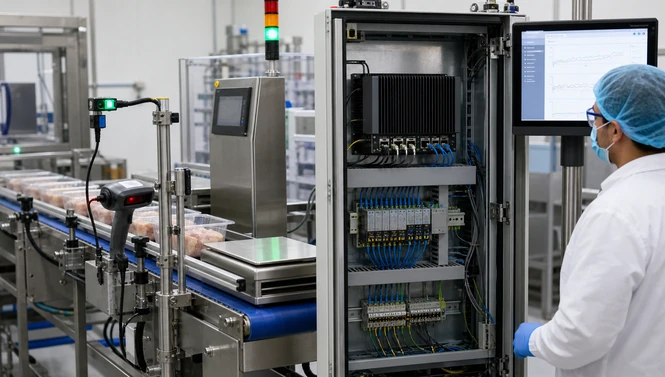
How an Industrial Computer Supports Food Safety Compliance
How an Industrial Computer Supports Food Safety Compliance
An industrial computer supports compliance by making controls more consistent and evidence easier to retrieve. Its role normally spans five functions:
-
Observe: acquire data from temperature probes, pressure transmitters, flowmeters, scales, metal detectors, vision cameras, and barcode readers.
-
Evaluate: compare data with process limits or pass/fail rules defined by the validated application.
-
Act: notify operators, stop or divert product through the control system, and escalate unresolved deviations.
-
Record: associate readings, alarms, acknowledgements, corrective actions, users, and time with the relevant batch or lot.
-
Communicate: exchange data with PLCs, SCADA, MES, laboratory systems, ERP, and traceability partners.
This makes the industrial PC an enabling component, not the compliance authority. A processor remains responsible for identifying hazards, determining critical control points, setting validated critical limits, defining corrective actions, and verifying that the system works. Hardware specifications such as an IP rating or stainless-steel enclosure address environmental suitability; they are not proof that the whole food-safety program complies with HACCP, ISO 22000, FSMA, BRCGS, SQF, or local law.
A useful compliance boundary
Ask two separate questions:
-
Can the hardware survive and operate in the intended zone?
-
Can the complete computerized process produce accurate, attributable, protected, and retrievable evidence?
Both must be answered before deployment.
Monitor Critical Control Points in Real Time
Monitor Critical Control Points in Real Time
HACCP monitoring is one of the clearest uses for an industrial computer. It can receive critical control point data from PLCs or instruments and present the current state to operators. Typical examples include pasteurization temperature and holding time, cold-storage temperature, cooking conditions, detector status, fill weight, pH, flow, or pressure.
The computer should not merely display a number. A useful monitoring design includes:
-
the current value and approved limit;
-
sensor identity and calibration status;
-
trustworthy timestamps;
-
lot, line, recipe, and product context;
-
clear warning and deviation states;
-
operator acknowledgement and reason codes;
-
predefined corrective-action prompts; and
-
local buffering if the server or network is unavailable.
An edge industrial PC can keep the operator interface and data capture close to the line, reducing dependence on a distant cloud connection. However, safety-critical interlocks should remain in the validated control architecture. A general-purpose computer should not replace a safety PLC or dedicated protective device unless the complete design is approved for that function.
Alarm handling also needs discipline. Too many low-value alarms create fatigue; missing escalation hides a real deviation. During validation, test the limit, delay, priority, acknowledgement, product-hold action, and recovery path. Confirm what happens after a sensor failure, frozen screen, full disk, time drift, or power interruption—not only during normal production.
Create Audit-Ready Electronic Records
Create Audit-Ready Electronic Records
Create Audit-Ready Electronic Records
An industrial computer can replace fragmented paper entries with structured electronic records, but “digital” does not automatically mean “reliable.” Audit-ready records should show who performed an action, what changed, when it occurred, which equipment and lot were involved, and why a correction was made.
Useful controls include:
-
unique user accounts and role-based permissions;
-
synchronized time across the computer, PLC, server, and inspection devices;
-
read-only raw data where practical;
-
audit trails for changed limits, recipes, and master data;
-
reason codes and electronic approval for corrections;
-
calibration and maintenance references;
-
protected backups and tested restoration;
-
retention periods aligned with applicable requirements; and
-
export formats that remain readable without obsolete software.
The FDA’s Food Traceability Rule FAQ makes an important technology-neutral point: the rule does not prescribe one specific recordkeeping application. That gives processors flexibility, but it also means they must demonstrate that their chosen system keeps required information legible, protected, and available.
Data quality begins at the source. A perfectly secured database cannot repair an incorrectly wired sensor, an uncalibrated scale, or a barcode assigned to the wrong production order. The validation scope must cover the full path from measurement to displayed value, stored record, report, and backup.

Strengthen Food Traceability and Recall Readiness
Strengthen Food Traceability and Recall Readiness
Strengthen Food Traceability and Recall Readiness
Strengthen Food Traceability and Recall Readiness
Food traceability depends on linking material movement and transformation events to the correct lot. An industrial computer for food processing can capture scans and equipment events at receiving, batching, processing, packing, palletizing, and shipping. It can then send the records to MES, ERP, warehouse, or traceability software.
For foods covered by the U.S. rule, the FDA describes Critical Tracking Events and associated Key Data Elements, including traceability lot codes. The operational lesson is broader than one regulation: capture data where the event occurs, validate required fields immediately, and preserve the relationship between incoming materials, processing steps, rework, packaging, and finished goods.
What good line-side traceability looks like
-
Scanners reject invalid or unexpected codes before the material enters the batch.
-
The system records line, time, operator, quantity, supplier lot, and finished lot.
-
Recipe and allergen checks prevent an unauthorized combination.
-
Rework is linked to both its source and destination lots.
-
Label data is compared with the production order.
-
Network outages queue transactions locally without creating duplicates.
-
A mock recall retrieves the affected scope within the target time.
An industrial computer reduces transcription and retrieval delays, but the plant must still maintain master-data quality and supplier coordination. If two partners use incompatible identifiers, faster computers will only move ambiguous data more quickly.
Improve Hygiene Through Correct Hardware Placement
Improve Hygiene Through Correct Hardware Placement
Food plants contain different environmental zones. The correct computer depends on cleaning method and exposure, not on the word “industrial” in a product name.
|
Zone
|
Typical exposure
|
Suitable approach
|
Verification needed
|
|
Dry control room
|
Dust, long runtime
|
Fanless embedded industrial computer
|
Temperature, dust, I/O, lifecycle
|
|
Protected cabinet near line
|
Humidity, vibration, occasional splash outside cabinet
|
Embedded computer inside sealed enclosure
|
Cabinet IP/NEMA rating, cooling, cable glands
|
|
Splash or wipe-down interface
|
Moisture and sanitizing wipes
|
Sealed-front panel PC or protected HMI
|
Front rating, gasket, chemical compatibility
|
|
Direct washdown zone
|
High-pressure/hot water, foam, chemicals
|
Fully sealed hygienic washdown computer or rated enclosure
|
Whole-unit rating, connectors, material, test report
|
An IP69K panel PC may be appropriate for aggressive washdown, but buyers must verify whether the rating applies to the entire unit or only the front panel. They should also confirm the test standard, connector state, cable assemblies, temperature and pressure conditions, mounting orientation, and chemical compatibility. “Stainless steel” alone is insufficient: joints, fasteners, gaskets, cable entries, surface finish, drainage, and crevices affect cleanability.
Fanless design helps by removing a common air intake and fan-failure point, but it does not make a box PC waterproof or hygienic. The verified SINSMART embedded models below should be installed in a dry/protected area or a separately engineered enclosure; their product pages do not state food-grade construction or direct-washdown ratings.
Connect Inspection and Automation Systems
Connect Inspection and Automation Systems
Connect Inspection and Automation Systems
Food-safety controls rarely operate in isolation. An industrial computer provides the interface capacity to combine multiple devices and send normalized results upstream.
Common connections include:
-
Ethernet: PLCs, cameras, checkweighers, labelers, MES, historians, and remote service.
-
RS-232/422/485: legacy scales, analyzers, temperature devices, scanners, and controllers.
-
USB: barcode readers, local service devices, cameras, and approved removable media.
-
GPIO/DIO: simple status, trigger, reject-confirmation, and interlock signals.
-
PCIe or M.2: additional network, frame-grabber, storage, or wireless modules.
Interface selection affects data integrity. RS-232 suits shorter point-to-point links; differential RS-422/485 is better for longer or noisier industrial paths, subject to the device protocol and topology. Use shielded routing, correct grounding, termination where required, locked connectors, strain relief, documented pinouts, and separation from high-power cables.
Machine vision can add label verification, seal inspection, fill-level checks, and foreign-material detection. The computer must have enough network bandwidth, storage throughput, and compute capacity for the required camera count and inspection rate. Acceptance testing should include worst-case line speed and defined false-accept/false-reject criteria.

Select the Right Industrial Computer Architecture
Select the Right Industrial Computer Architecture
Select the Right Industrial Computer Architecture
For dry or protected food-production zones, SINSMART offers embedded computing systems and fanless industrial mini PCs with different performance and I/O profiles. The following current product-page comparison uses only equivalent verified fields.
|
Model
|
Processor support
|
Max RAM
|
Network
|
COM
|
USB
|
Power input
|
Operating temperature
|
|
Intel Core 8th/9th Gen
|
32 GB
|
4× Gigabit
|
2× RS-232/422/485
|
6
|
8–35 VDC
|
-25°C to 60°C
|
|
|
Intel Core 12th/13th Gen
|
32 GB
|
4× 2.5GbE
|
4
|
6
|
8–48 VDC
|
-25°C to 70°C
|
|
|
Intel Core i5-1135G7
|
32 GB
|
2× Gigabit
|
6, including 2 configurable RS-232/422/485
|
6
|
12 VDC
|
Not stated
|
The SIN-3049-H310 provides four Gigabit ports plus isolated DIO for multi-device data acquisition. The SIN-3094-H610E adds newer processors, four 2.5GbE ports, wider voltage input, and a stated wider temperature range, making it a stronger candidate for high-throughput edge workloads. The SIN-3092-1135 offers six COM ports and is attractive when a line must integrate several serial devices.
These are starting points, not automatic food-safety selections. Confirm the exact CPU, memory, storage endurance, operating system, TPM/security needs, image lifecycle, recovery method, connector count, and enclosure before ordering.
Validate the Complete Compliance System
Validate the Complete Compliance System
Validate the Complete Compliance System
Validation should demonstrate intended use under normal and abnormal conditions. Start with a user requirements specification that connects every hardware and software requirement to a food-safety or operational need.
Procurement and acceptance checklist
-
Classify the installation zone and document cleaning chemicals, pressure, temperature, humidity, and splash direction.
-
List every PLC, sensor, scanner, camera, scale, and analyzer with protocol and port requirements.
-
Define alarm limits, delays, priorities, acknowledgements, escalation, and product-hold behavior.
-
Specify users, roles, audit trails, time synchronization, retention, backup, and export.
-
Size CPU, memory, network, and storage for peak line rate plus planned expansion.
-
Require a stable bill of materials and notification before component or firmware changes.
-
Perform factory and site acceptance tests with calibrated inputs.
-
Test power loss, network loss, sensor failure, disk-full condition, clock drift, and recovery.
-
Run traceability exercises and retrieve records without vendor assistance.
-
Train operators, sanitation staff, maintenance, QA, and IT/OT support.
Review the system after process, recipe, hardware, operating-system, or network changes. Patch and antivirus decisions should be risk-based and tested before production. Maintain a recoverable system image and spare strategy. A validated industrial computer can make food-safety controls more visible and repeatable; disciplined lifecycle management keeps that value intact.
For a project-specific recommendation, send SINSMART the installation zone, sanitation method, ambient range, device list, required ports, software stack, storage/retention target, and regulatory market. That information enables a useful configuration review instead of a generic processor quote.

FAQ
FAQ
FAQ
Q1: Can an industrial computer make a food plant HACCP compliant?
No. It can automate monitoring, alarms, records, and traceability, but the processor must still establish a valid HACCP plan, procedures, training, verification, and corrective actions.
Q2: What data can an industrial computer collect at a critical control point?
It can collect values such as temperature, time, pressure, flow, pH, weight, detector results, barcode events, equipment status, and operator acknowledgements when compatible instruments and validated interfaces are used.
Q3: Is a fanless industrial PC suitable for a washdown area?
Not automatically. Fanless design removes an air-moving component, but direct washdown requires verified whole-unit protection, sealed connectors, cleanable materials, suitable mounting, and chemical compatibility.
Q4: What is the difference between IP65 and IP69K for food processing?
IP65 addresses dust ingress and water jets under its test conditions. IP69K addresses close-range, high-pressure, high-temperature water jets under the applicable test method. Buyers must verify the exact certificate scope and whether protection covers the whole assembled system.
Q5: How does an industrial computer improve food traceability?
It captures lot and process events at the line, validates required identifiers, links material transformations, and sends structured records to MES, ERP, warehouse, or traceability systems for faster retrieval.
Q6: Which interfaces matter most in a food-processing industrial PC?
Ethernet, RS-232/422/485, USB, and DIO are common. The right mix depends on PLCs, scanners, scales, cameras, analyzers, inspection equipment, network design, and required redundancy.
Q7: Should food-safety records be stored locally or on a server?
Many plants use both: local buffering preserves data during network loss, while a controlled central system supports retention, backup, review, and cross-line traceability. Reconciliation and duplicate prevention must be tested.
Q8: What should be tested before production release?
Test calibrated inputs, limits, alarms, user permissions, timestamps, audit trails, reports, backup/restore, power and network failures, full-disk behavior, corrective actions, and mock traceability retrieval.
Q9: What information should be included in an industrial-computer RFQ?
Include the plant zone, cleaning method, ambient limits, mounting, power, devices and protocols, I/O count, software and OS, performance, storage, retention, cybersecurity, validation deliverables, lifecycle, and change-notification requirements.


LET'S TALK ABOUT YOUR PROJECTS
- sinsmarttech@gmail.com
-
3F, Block A, Future Research & Innovation Park, Yuhang District, Hangzhou, Zhejiang, China
Our experts will solve them in no time.