
 Rackmount PC
 Embedded Computing
 Industrial Portable Computers
 Rugged Tablets
 Rugged Laptop
 Industrial Panel PC
 Rugged Handheld
 Advantech Industrial PC
Tutorial on Creating Integrated RAID on Industrial Computer Motherboard
Generally, servers are equipped with two or more hard disks to form a disk array. How does the motherboard create a RAID disk array? In fact, the method is very simple. Here is a graphic tutorial on how to create RAID0 and RAID1 on the server.
Table of Contents
1. First, change the SATA mode to RAID mode; after the server computer is turned on, we repeatedly press the "DEL" key to enter the motherboard BIOS interface and switch to "Advanced", as shown in the figure below.

2. Change the option of configure SATA as to "RAID", as shown in the figure below.

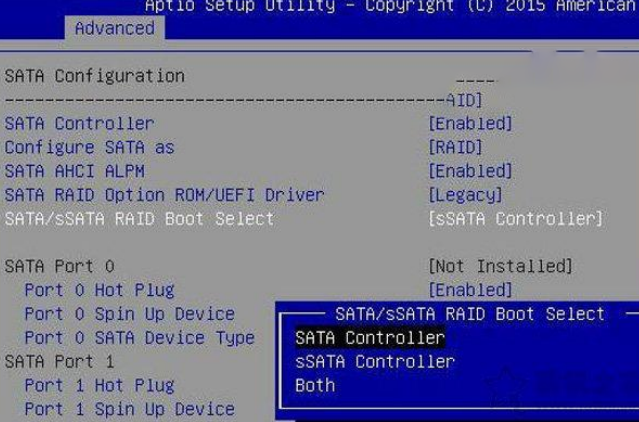
3. The motherboard SATA port has two chips, SATA and sSATA. If your hard disk is connected to the SATA interface, change the option of SATA/sSATA RAID Boot Select to "SATA Controller". After adjustment, press F4 to save the settings, as shown in the figure below.
4. Generally, when two hard disks are connected, the following interface will be entered. We press the "CTRL+I" key combination to enter the "RAID" setting interface.

5. Select 1.create RAID Volume to create a RAID disk array, as shown in the figure below.

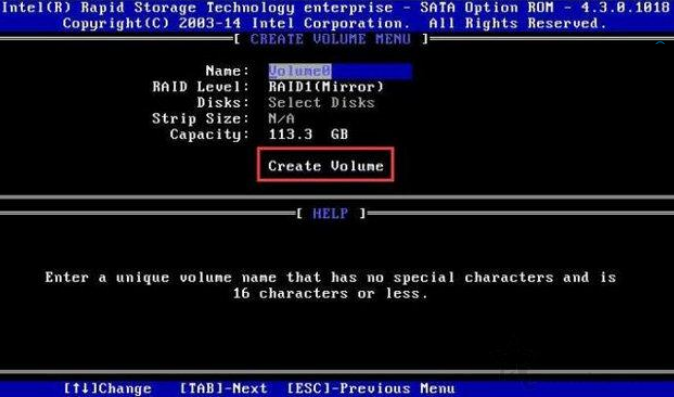
6. name is the name, which can be the default. For example, if we want to build RAID1, we will select RAID1. If we want to build RAID0, we will select RAID0. Finally, select Create Volume to create a disk array.
Note
RAID0: You can add the capacity of multiple hard disks and virtualize it into one hard disk. The capacity is the sum of the two hard disks.
RAID1: It is an array composed of two hard disks, one of which is used as a backup disk, and the available capacity is only 1/2 of the total capacity.
The above is the shared graphic tutorial on how to build RAID0 and RAID1 on the server.


LET'S TALK ABOUT YOUR PROJECTS
- sinsmarttech@gmail.com
-
3F, Block A, Future Research & Innovation Park, Yuhang District, Hangzhou, Zhejiang, China
Our experts will solve them in no time.